Here's how cannabis collections usually work at a brand. The office runs an aging report. Someone exports it, sorts it by rep, and emails each rep a spreadsheet. The reps are on the road. The spreadsheet sits in an inbox. Two weeks later the same invoices are still open, and now they're a month older.
The frustrating part is that the rep is the best collector you have. The buyer knows them. The buyer answers their texts. A dispensary will ignore a third notice from an accounting address and pay the same day when their rep says "hey, can you knock out #1043 for me?" The rep just never had the list, or the link, in the moment they were talking to the buyer.
So we built the weekly sales rep collections email. It's part of ShelfCollect, and it turns every rep into a collector without adding a single task to their week.
What lands in each rep's inbox on Monday
One email per rep, every Monday at 7 AM their time. It opens with four numbers: total owed, the amount 31+ days late, the number of invoices, and the number of accounts. Then every open invoice on their accounts, grouped by how late it is and sorted oldest first: 91+ days, 61–90, 31–60, 1–30, then the ones that aren't due yet.
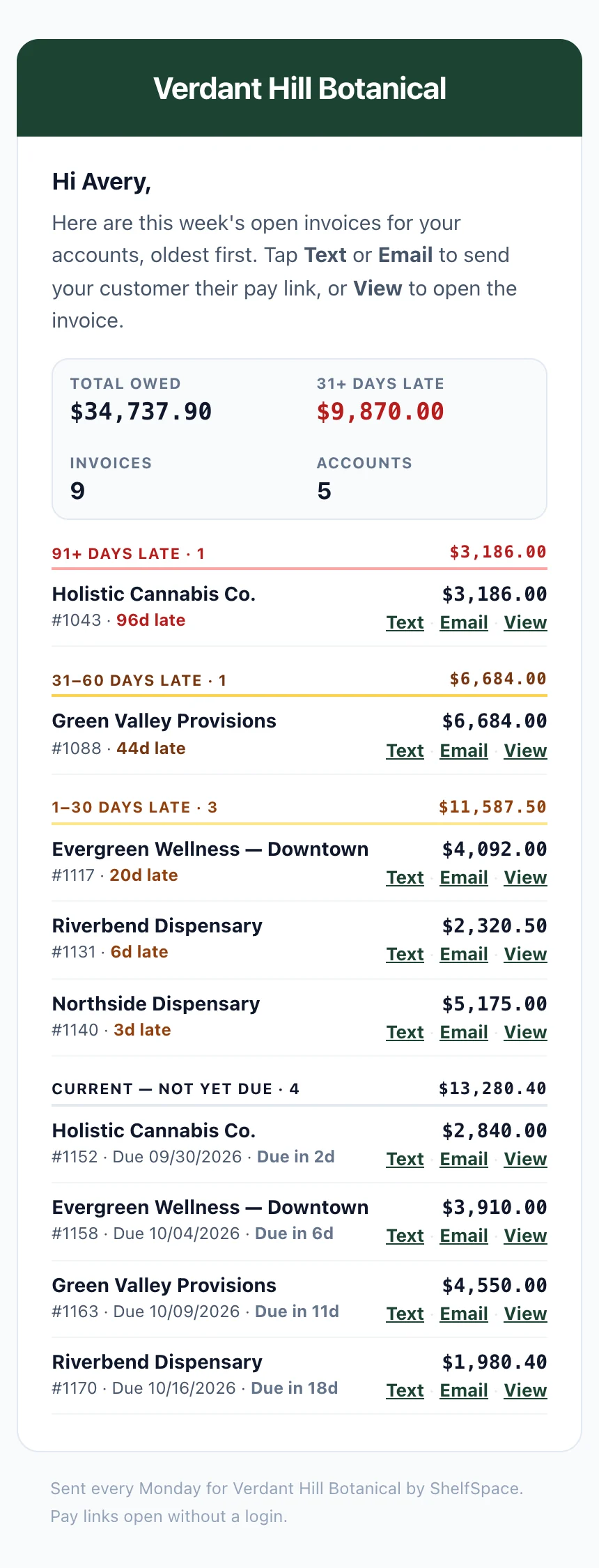
The real email, as a rep sees it on their phone. Shown with sample accounts and amounts.
The not-yet-due invoices matter more than they look. A rep walking into a store on Tuesday can say "you've got one due Friday too" and clear two invoices in one conversation. That's how you stop invoices from going late in the first place.
One tap to ask for the money
Every invoice row has three buttons. This is the part reps love, because it takes the awkward out of asking.
The buyer taps the pay link and lands on a single pay page. No account to create, no password, no app. They pay from their own bank, and the money comes to you. It never passes through us. If you want the details on that part, read how ShelfCollect collects on overdue invoices.
Nobody logs in to anything. Not the rep reading the email, not the buyer paying it. Everything works from a phone.
Set up your reps and their accounts in minutes
The email is only as good as the answer to "whose account is this?" That lives at Settings › Sales Reps in your vendor portal, and it's built for a real sales team, not a demo:
- Add your reps. Name, email, phone, title, and the states they cover.
- Assign accounts by account. Every dispensary you sell to, one rep dropdown per row. Unassigned accounts float to the top so you see the gaps first. Search, filter by rep, or select a batch and move them all at once.
- Or assign by rep. Open a rep, see their book, and hand them more accounts.
- Or import your spreadsheet. Most brands already track this in Excel. Upload it and the platform matches each account, adds any new reps, and shows you every change before anything is saved.
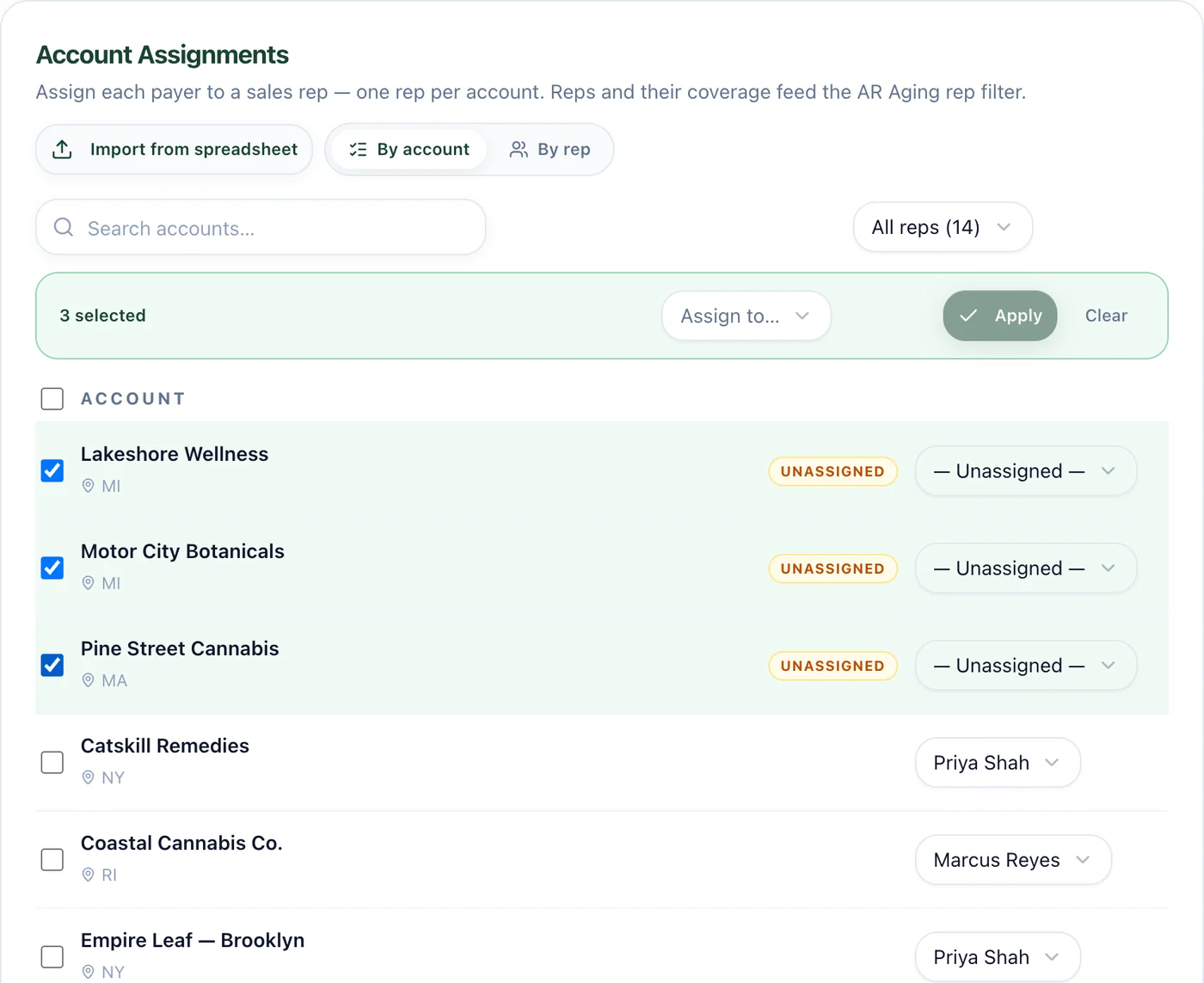
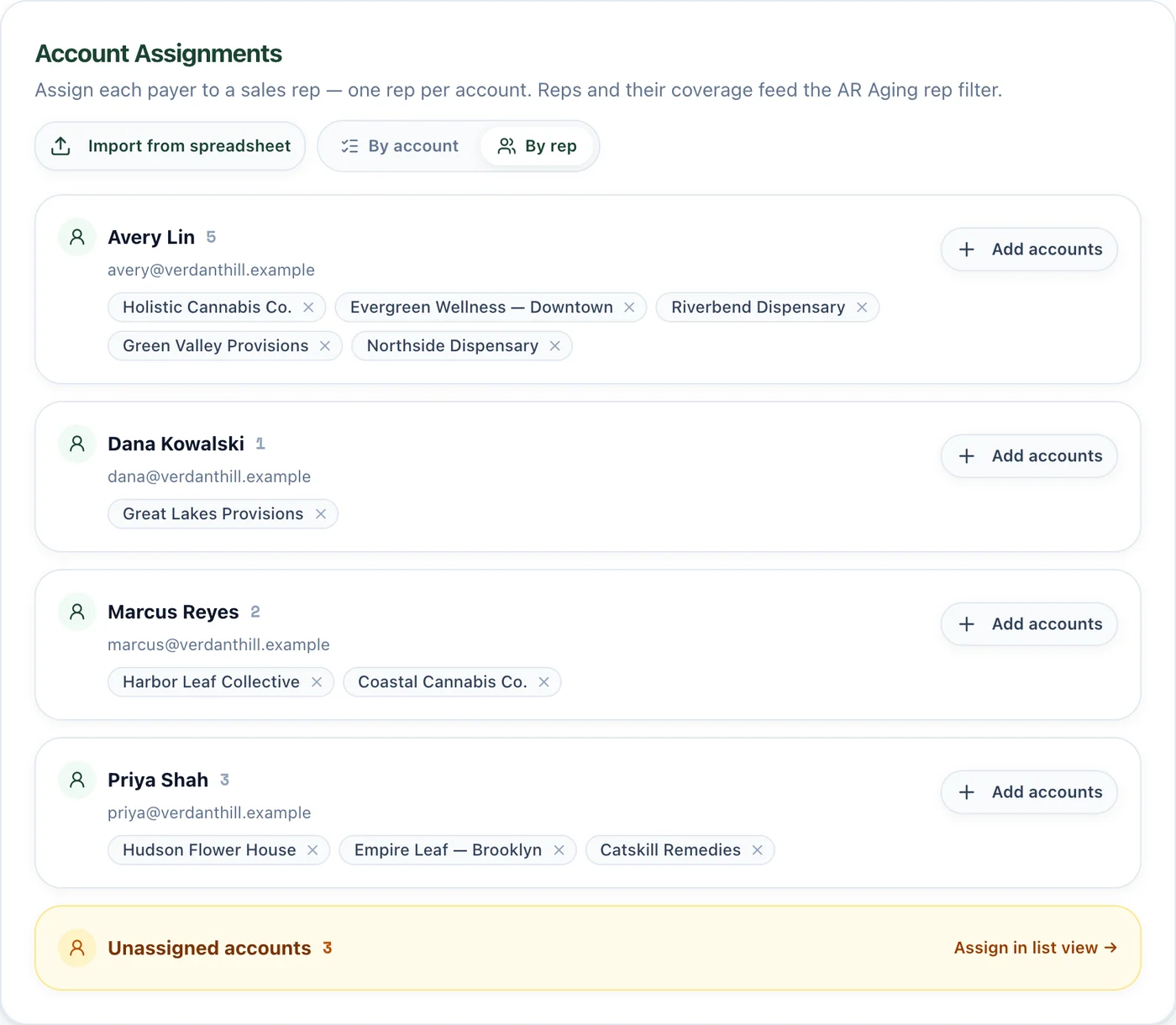
By account or by rep. Select a batch of unassigned accounts and assign them in one move, or open a rep and hand them more.
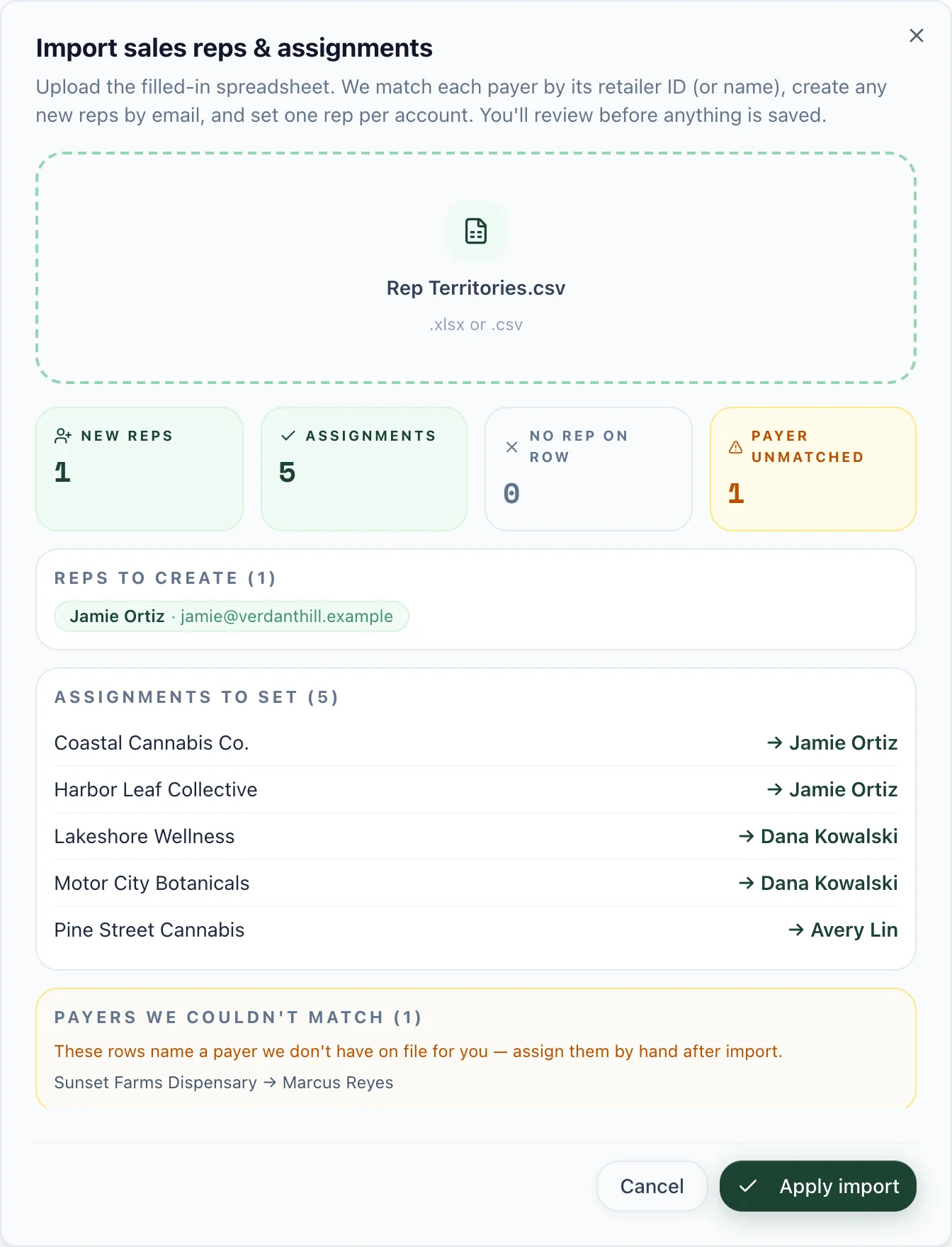
Import from your spreadsheet. You see every new rep and every assignment before anything is saved, plus anything that didn't match.
One rep per account keeps it simple. Reassigning a territory is a dropdown change, and next Monday's emails follow it.
7 AM
Every Monday, in your time zone
1 rep
Per account, so every invoice has an owner
0 logins
For the rep or the buyer
No account falls through the cracks
Every sales team has accounts nobody owns: a house account, a store from a rep who left, a new buyer that hasn't been assigned yet. Those don't disappear. Any account without a rep goes into one email to your AR contact, with the same one-tap buttons. The same happens if a rep has no working email or opts out. Someone always has the list.
Run your Monday sales meeting from AR Aging
Your AR Aging screen now has a sales rep filter. Pick a rep and the aging buckets and invoice list narrow to their accounts. Pick Unassigned to see what nobody owns. It turns the Monday sales meeting into a quick walk down the list, rep by rep, instead of a spreadsheet hunt. See the full cannabis accounts receivable picture for how aging, reminders, and pay links fit together.
You stay in control of what goes out
Before a single rep gets an email, you can see exactly what they'll see. The Weekly collections digest card in Settings › Sales Reps lets you:
- Turn the weekly email on or off for your company
- Preview the email as any rep
- Send yourself a test copy
- Switch it off for one rep, or turn a rep back on
- Choose whether unassigned accounts go to your AR contact
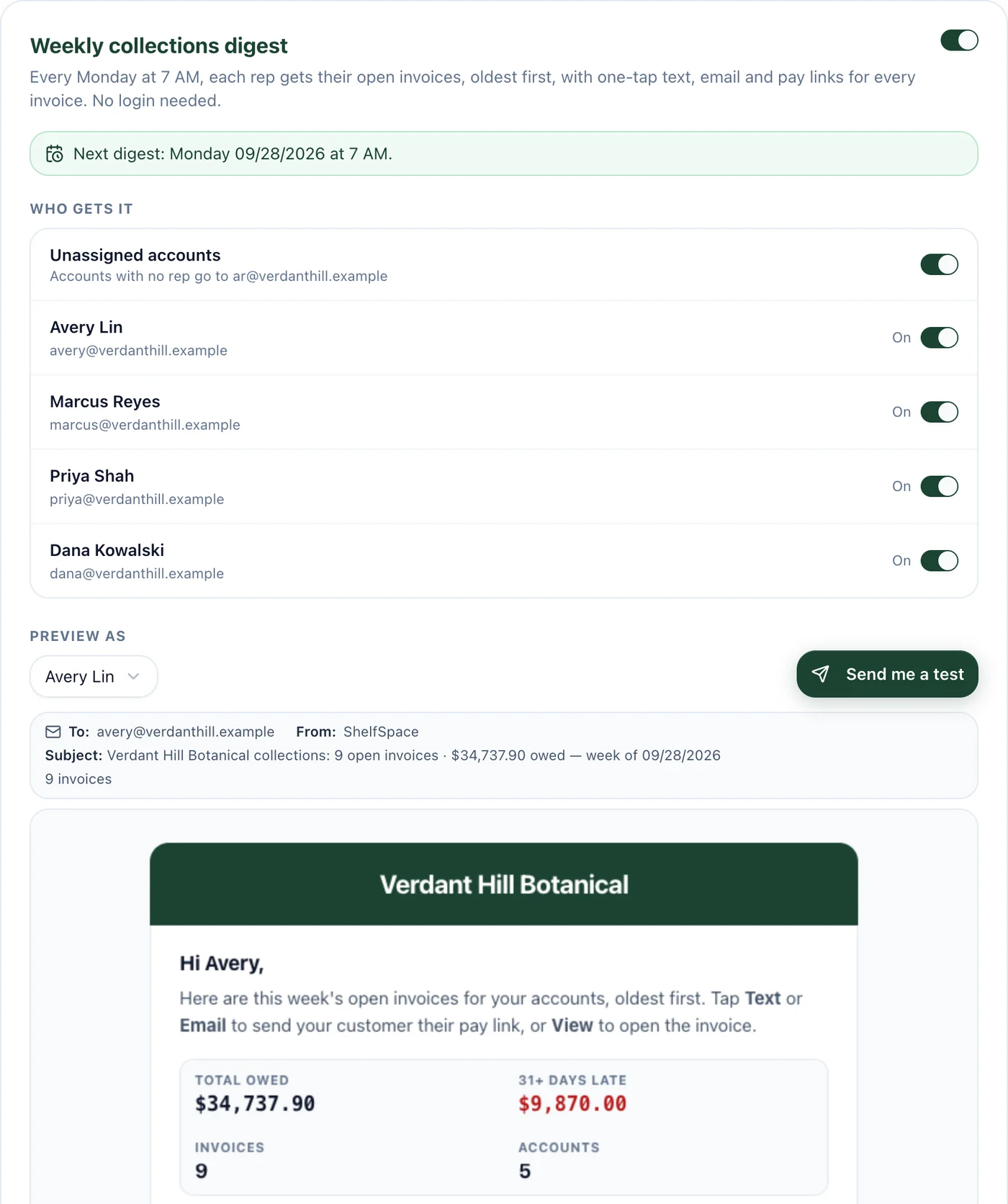
The Weekly collections digest card. Turn it on, choose who gets it, and preview any rep's email before Monday.
The email carries your logo and colors, so reps recognize it as yours. Replies go to your AR inbox. The step-by-step setup is in the weekly sales rep collections email doc and the sales rep assignments doc.
Why this changes collections for cannabis brands
Collections at a cannabis brand has always had a gap between the people who know what's owed and the people who can get it paid. Accounting has the numbers. Sales has the relationships. The weekly rep email closes that gap every Monday: the right person, the right list, and a link the buyer can pay in a minute.
The rep who made the sale is the rep who gets it paid. They just needed the list and the link in their pocket.
If you sell into cannabis and your reps have never seen the AR report, this is the fastest way we know to shrink it.