Cannabis payments

Cannabis payments that take one click, not one afternoon.

Pay your vendors and get paid by your stores from one screen. Every payment goes out as an e-check, a mailed paper check, or an ACH bank transfer, and every one ties back to its invoice.

E-check Mailed paper check ACH bank transfer rolling out
Talk to us See the pay page
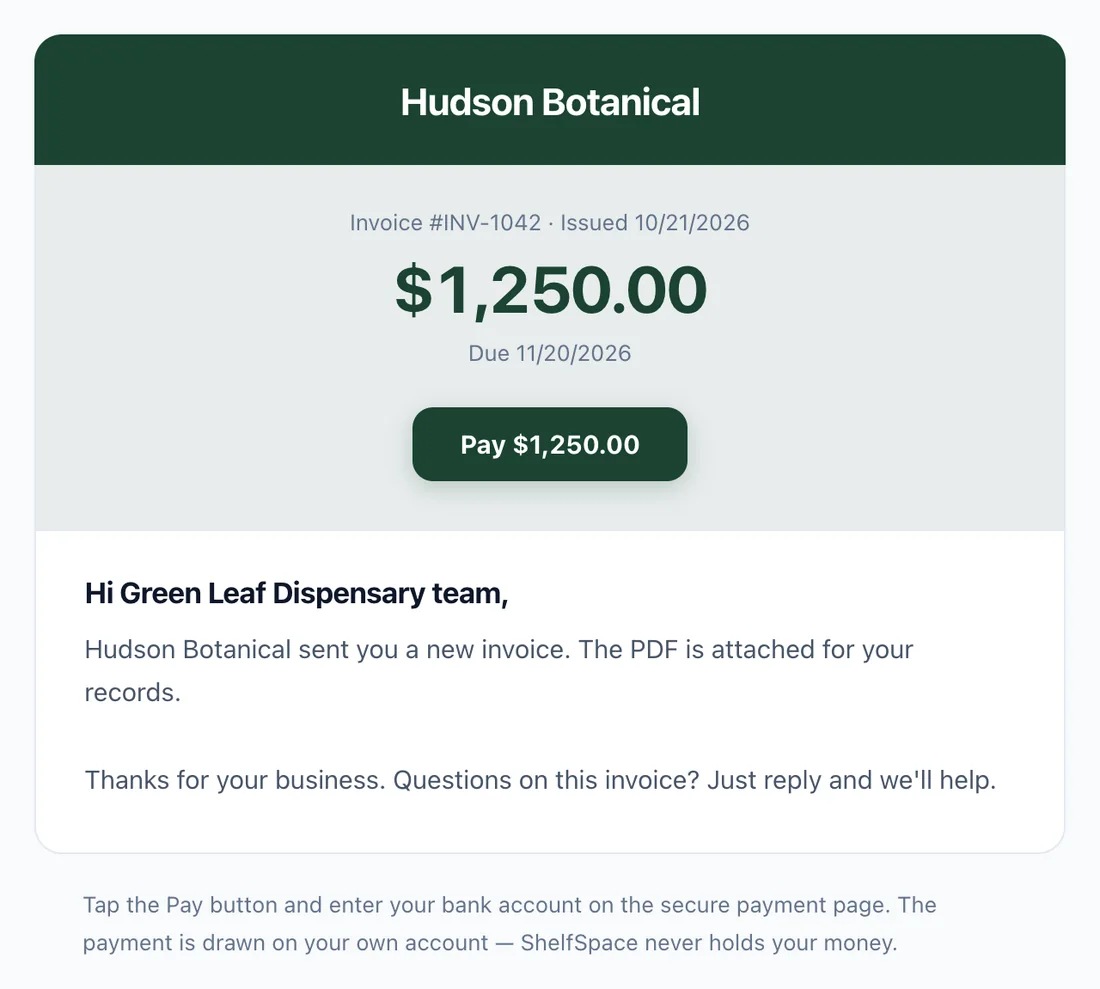
The invoice email a store receives: amount due, due date, and one Pay button
1. The store gets the invoice by email.
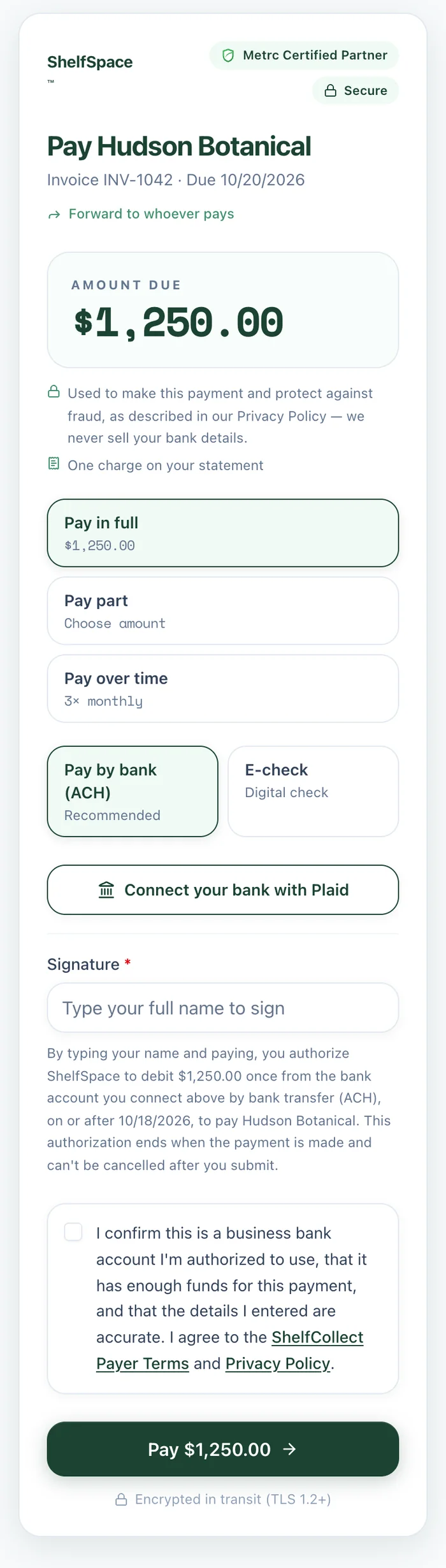
The ShelfSpace pay page on a phone: pay in full, pay part, or pay over time, by bank or e-check
2. They tap Pay and finish on their phone.

E-check, paper check, or ACH. Same payment, your choice of delivery.

Whichever way it goes, the amount, the invoice it pays and the record in your books are the same.

Live today

E-check

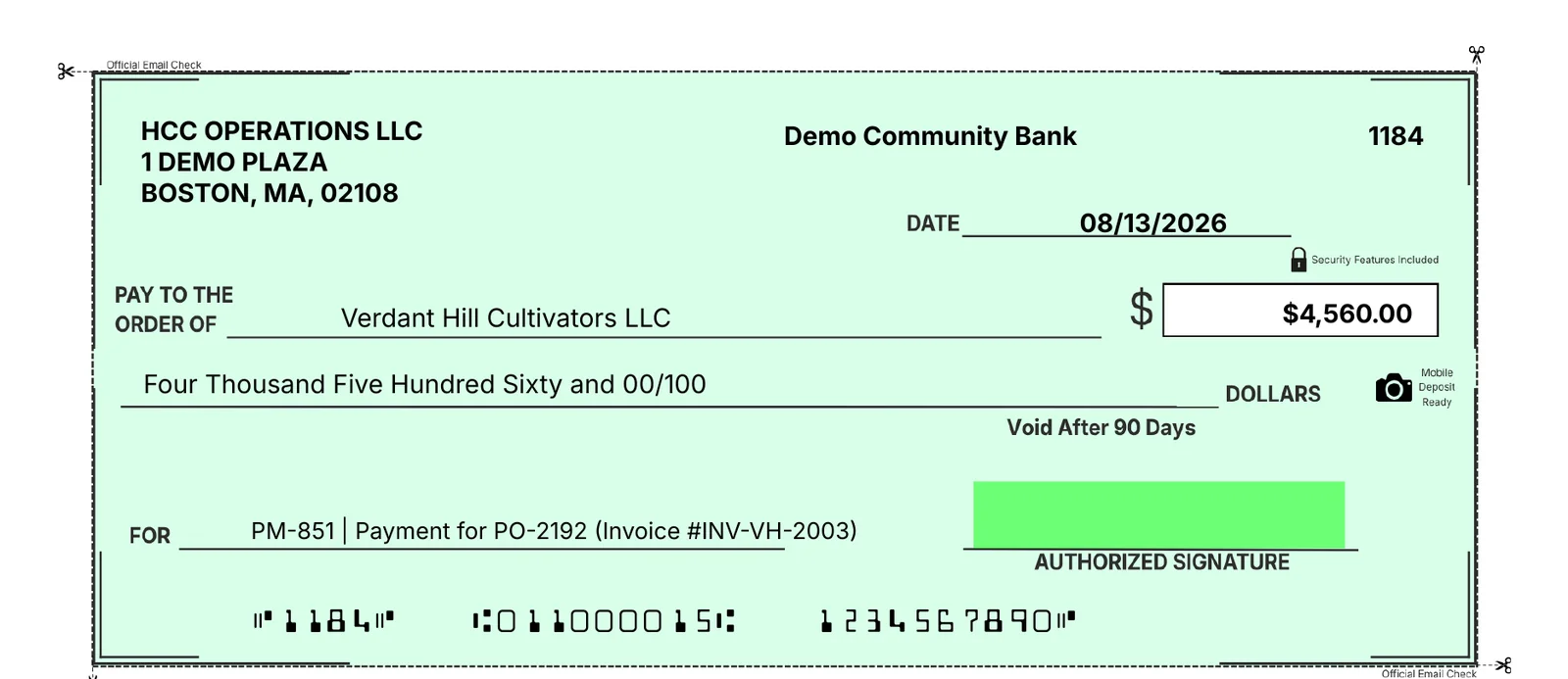
A real Check 21 check, ready the moment you click Send. Your vendor downloads it, prints it on plain paper and deposits it from their phone. No check stock, no stamps, no trip to the post office.

  • Ready to deposit the same day
  • Mobile deposit, scanner or teller
  • Anyone can verify it at shelfspace.pro/verify
Live today

Mailed paper check

For the vendor who wants paper in hand. It's the same check, printed and mailed by us. You still just click Send.

  • Nothing to print or stuff on your end
  • Same check number, same record
  • Set per vendor, not all-or-nothing
Rolling out

ACH bank transfer

Money moves bank to bank, usually in 1–3 business days. Banks are connected with Plaid, so nobody types an account number and nobody's bank details sit in an email.

  • Bank connected with Plaid in about a minute
  • Nothing to print or deposit
  • E-check stays one tap away as a backup
A ShelfSpace e-check: payee, amount in numbers and words, memo with the PO and invoice number, and the bank line printed at the bottom
A real e-check from our demo account. It prints on plain paper and deposits like any other check.
For dispensaries

Check the boxes. Click Send. Every vendor is paid.

No check book, no printer, no stamps. Pick what to pay from your open payables and send it all at once.

1

Pick what to pay

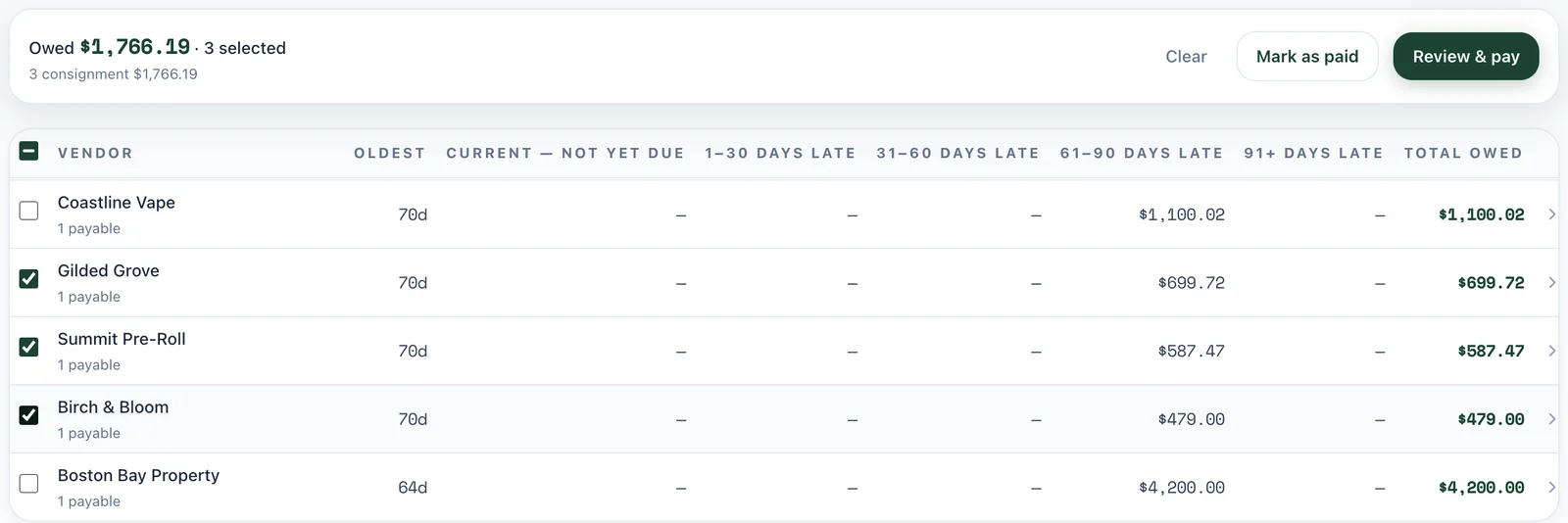
Your open payables, sorted by how late they are. Tick the vendors you want to pay today and the total updates as you go.

The open payables table with three vendors selected and a Review & pay button showing the total owed
2

Review and send

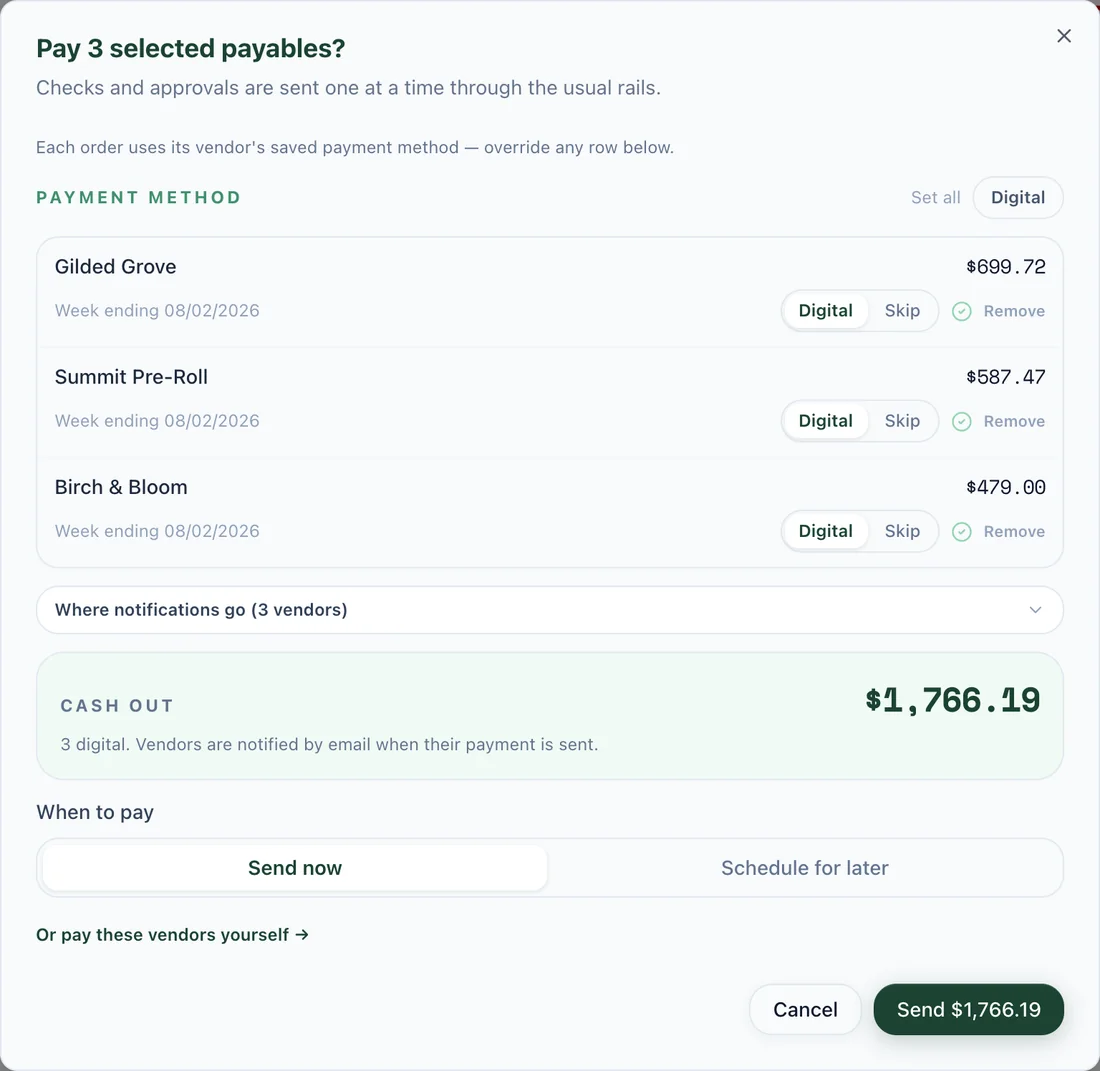
Each vendor gets paid the way they prefer. Change any row if you need to, send now or schedule it for later, and see the cash going out before you commit.

The pay dialog: three vendors, payment method per vendor, total cash out, send now or schedule for later
3

Your vendor hears about it right away

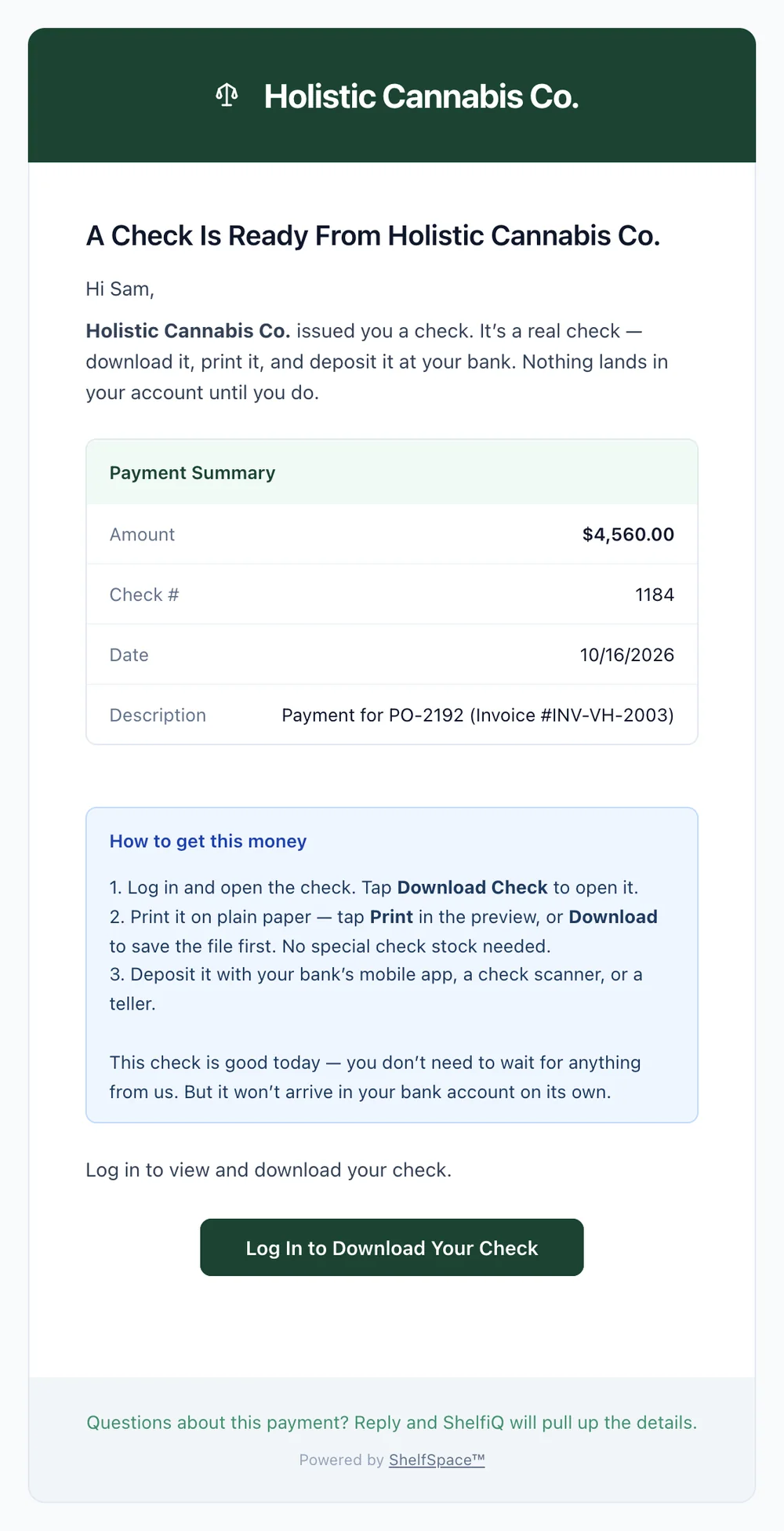
They get an email with the amount, the invoice it pays and simple steps to deposit. The check is in their portal, so you won't get a "where's my check?" call.

The email a vendor receives when a check is ready: payment summary and three steps to deposit it
For brands & vendors

Your buyer pays from the email in under a minute.

No login, no account to create, no portal to learn. The pay link opens a single page with the amount already filled in.

1

The invoice lands with a Pay button

It comes from your business name, with the PDF attached. One button, with the exact amount on it.

Invoice email from the vendor with the amount due and a Pay button
2

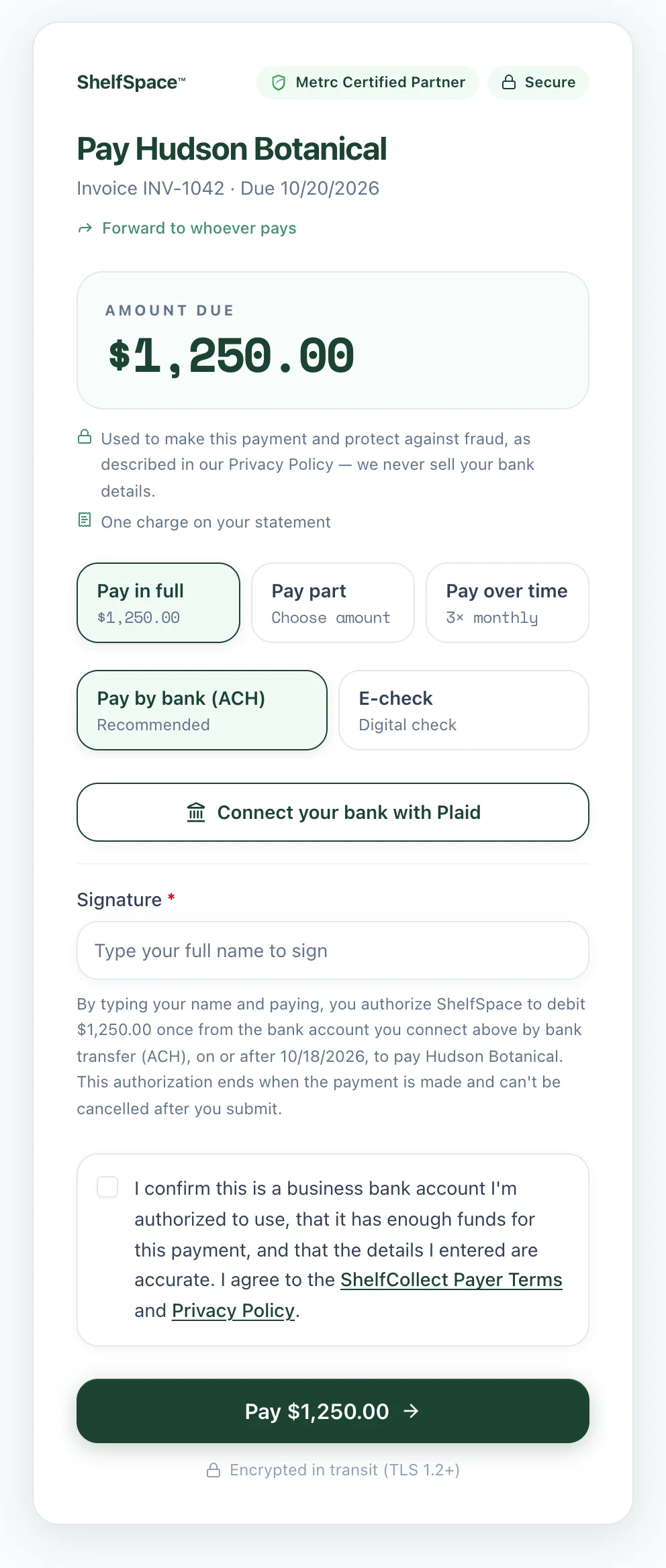
Pay in full, pay part, or pay over time

Short on cash this week? They can pay part now or split it into installments you allow. Partial money in the bank beats a promise.

Paying by bank: one tap on Connect your bank with Plaid, log in to their bank, done. Nothing to type.

The pay page: amount due, pay in full / part / over time, and pay by bank with a Connect your bank with Plaid button
3

Sign, confirm, done

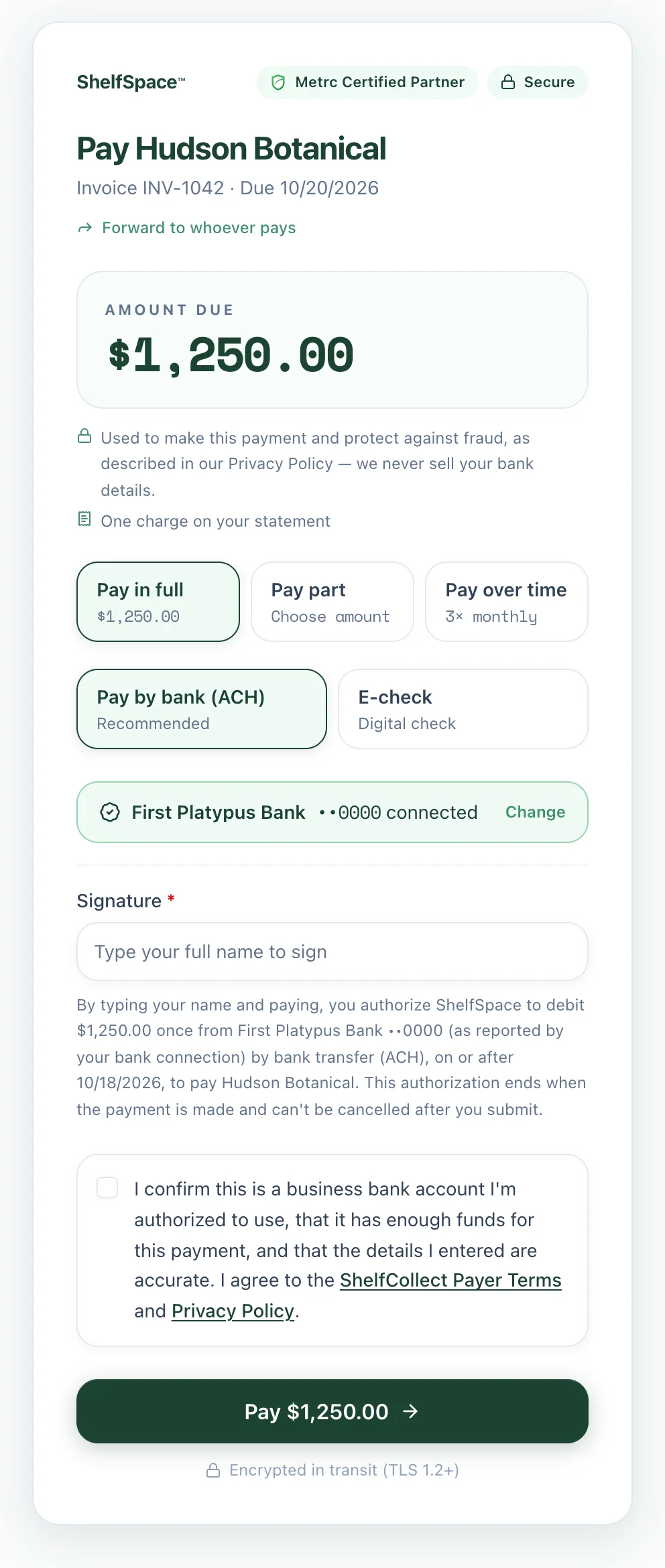
Their connected bank shows up by name. They type their name to sign, confirm once, and the payment is on its way to you.

The pay page after the buyer's bank is connected, showing the bank name and last four digits
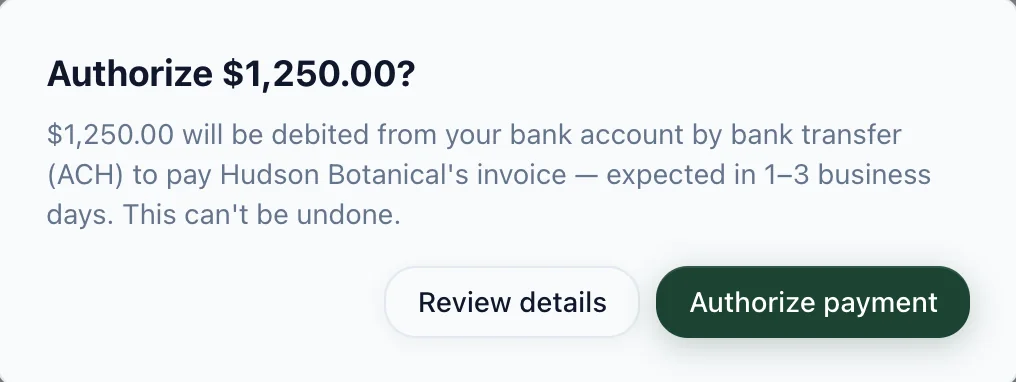
The final confirmation: Authorize $1,250.00, expected in 1 to 3 business days
4

Prefer a check? It's on the same page.

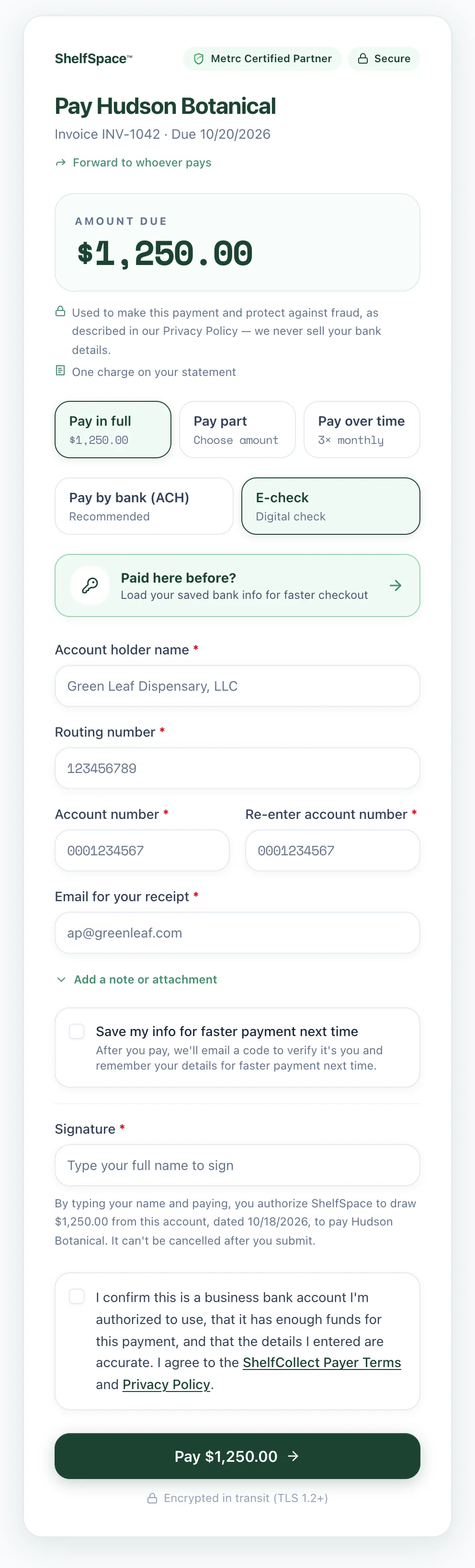
E-check works at every bank, today. They enter the account once, and next time they can load it from their saved info.

The e-check option on the pay page: account holder, routing and account number, and a saved-info shortcut for repeat payers
60 sec

A store that had owed one of our brands for 26 days opened the pay link, paid the full $11,718 a minute later, and the brand deposited it that same morning.

Every payment, in one list, with a download button.

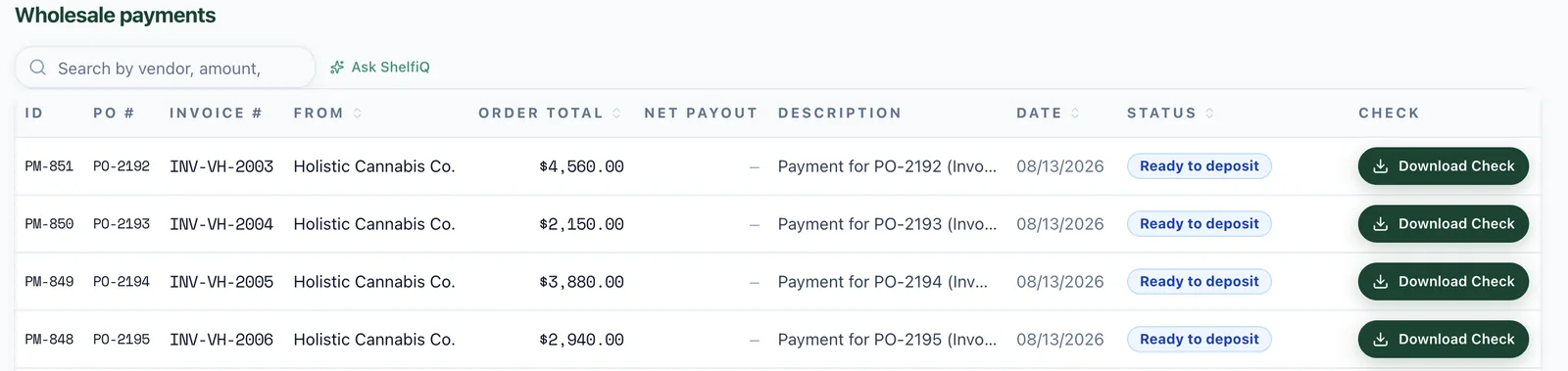
Vendors see every payment from every store in one place. Checks are a click away, and ACH payments show when they'll land.

The vendor's payments received list: each payment with its PO, invoice number, amount, status and a Download Check button
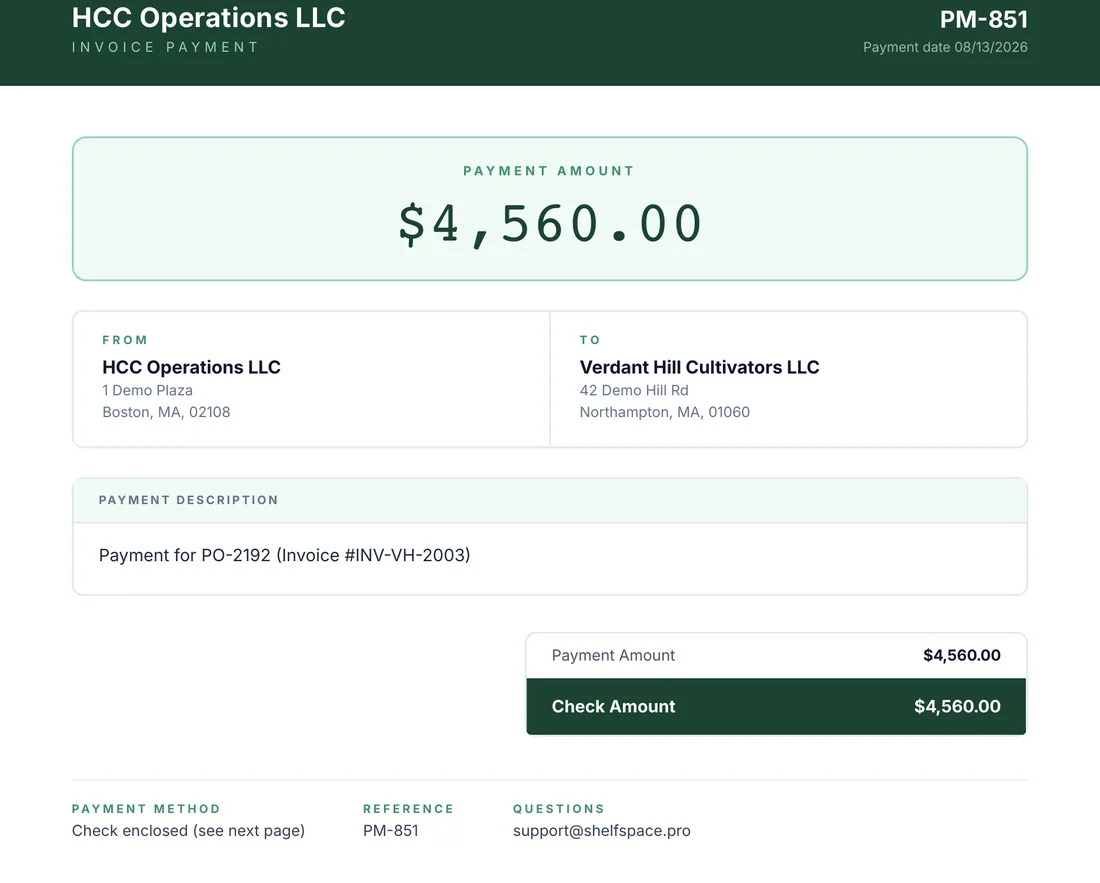
The payment page that comes with every check: from, to, amount and the invoice it pays
Every check comes with a payment page naming the invoice it pays.
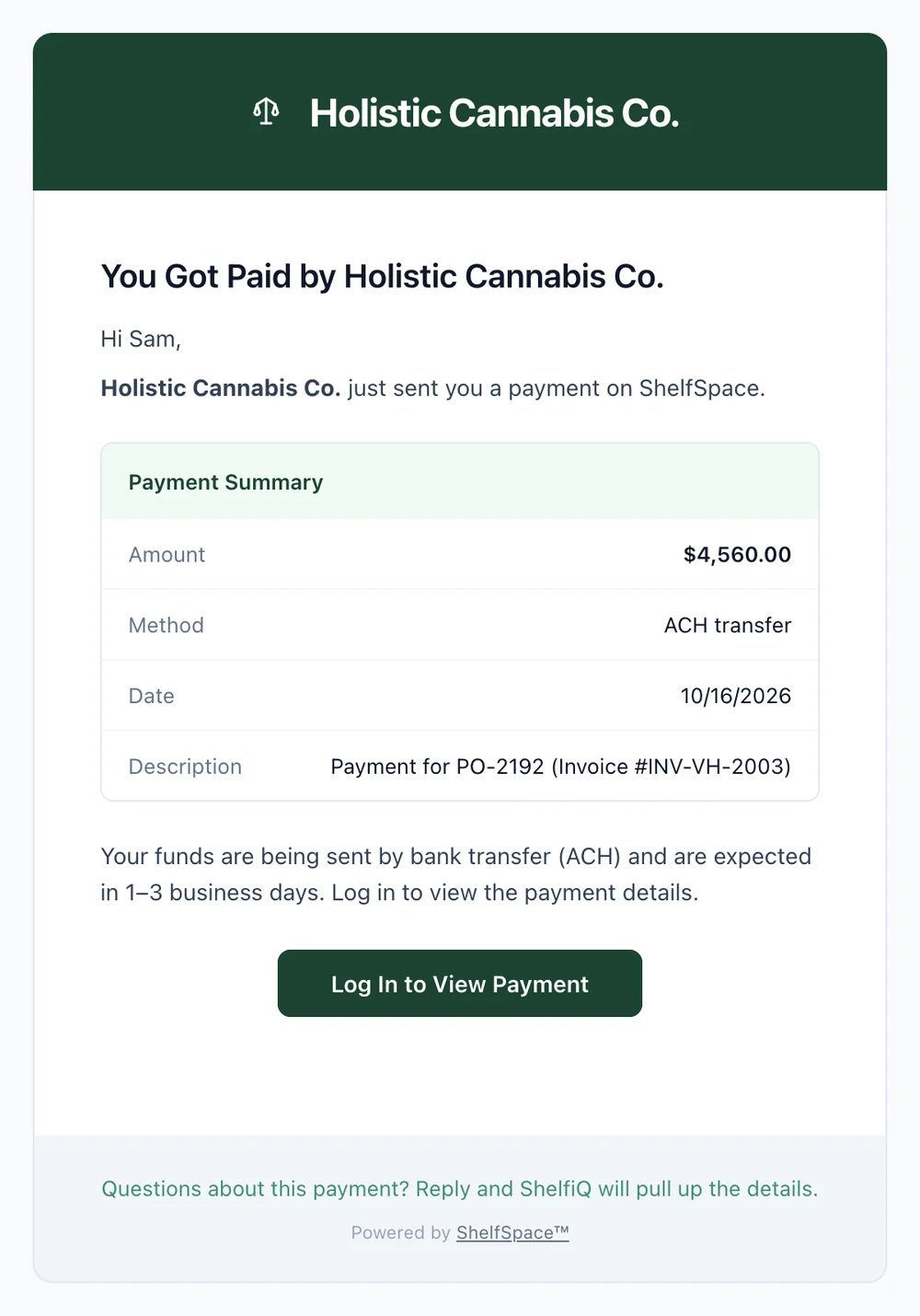
The email a vendor receives for an ACH payment, expected in 1 to 3 business days
ACH payments send a heads-up with when to expect the deposit.

Payments, answered

Yes. It's a Check 21 check, legally the same as a paper check, and it deposits through mobile deposit, a scanner or a teller. Here's how depositing works.
ACH is rolling out account by account. Until it's on for yours, every payment goes as an e-check or a mailed check, and nothing about how you pay changes.
No. The pay link opens a single page with the amount filled in, with no login and no sign-up. They can forward it to whoever cuts checks at their store.
Your bank does. A check is drawn on the payer's own account and deposited into the payee's, so ShelfSpace never sits in the middle holding your money.
ACH banks are connected through Plaid, so no one types or emails an account number. E-check details are encrypted in transit and never sold, and nothing moves without a signed authorization.

Your next payment run could take one click.

Tell us how you pay and get paid today. We'll set it up and run it for you.

Free. No commitment. We'll show you the money you're missing.