The invoice went out in July. The reminders went out on schedule. The buyer stopped answering somewhere around the third one. Now it's 87 days past due, the balance is $7,200, and every new email from you lands in the same pile as the last four.
At that point another reminder isn't a plan. What the store needs is one clear, last step: a letter that says what's owed, the date it has to be paid by, how to pay it in a few minutes, and what you'll do if it isn't. Most brands never send one, because writing it by hand for every late account takes time nobody has. And no collection agency is needed to send it.
ShelfCollect builds that letter for you, from the invoice itself, on your own letterhead.
What's on the letter
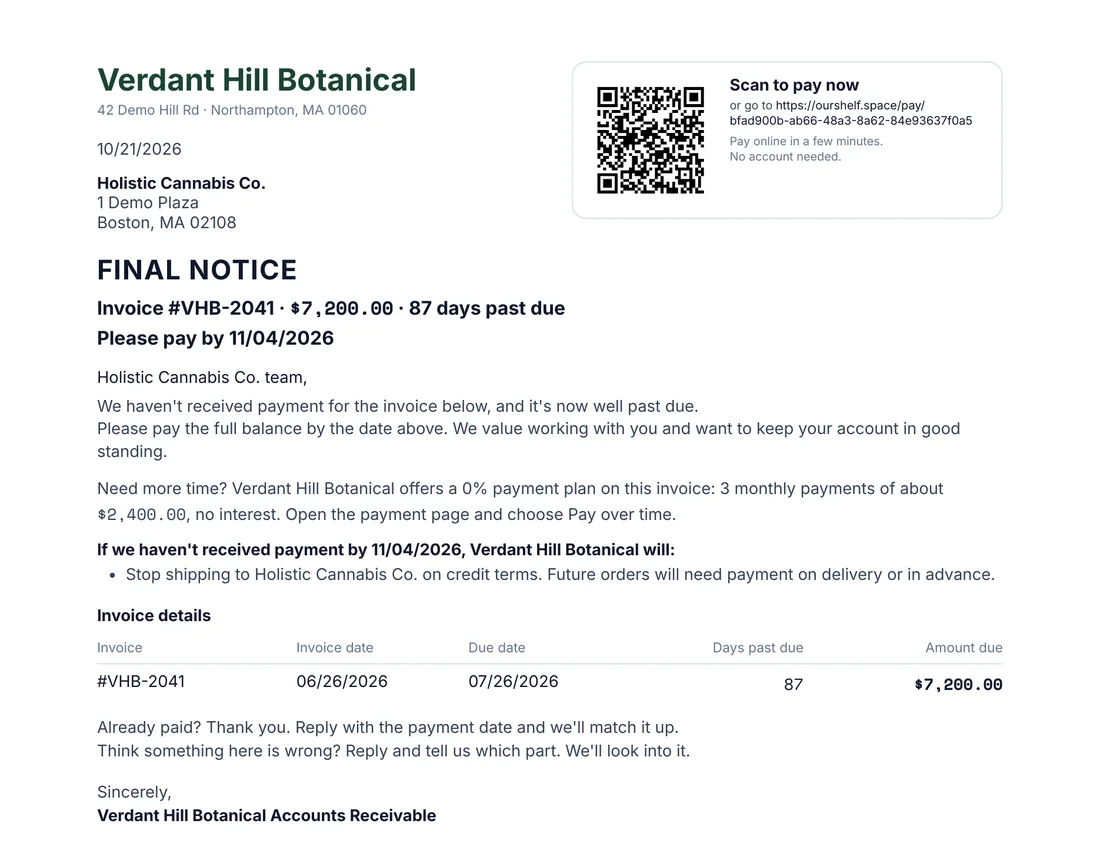
It's always one page, and every number on it comes straight from the invoice:
- Your company's name on top, with the store's name and address below it.
- A "Scan to pay now" box in the upper right. The store scans the code with a phone, or types the link, and pays the remaining balance online. No account needed.
- A bold headline and pay-by date: the invoice number, what's owed, how many days past due, and "Please pay by" the date you chose.
- Your message, in your own words.
- A payment-plan line when you offer a 0% plan on that invoice, with the number of payments and about how much each one is.
- The invoice details: invoice date, due date, days past due and amount due.
- A way out for honest mistakes: "Already paid? Thank you. Reply with the payment date and we'll match it up." and "Think something here is wrong? Reply and tell us which part."
- Your signature: "Your Company Accounts Receivable". The letter is signed by your AR team, never by one person.
When a letter is offered
You decide how late is late. In Payments, open Settings, then Collections, and set how many days past due an invoice has to be under Final notice letters. It starts at 60 days.
Once an invoice passes that mark, a Final notice button appears on its row in AR Aging, your list of who owes you sorted by how late they are. It sits right between Mark paid and Can't collect?.

Some invoices are never offered a letter, because the letter would ask for money that's already being sorted out: an invoice that's disputed, paused, waiting on a promise to pay, on a payment plan, or already paid.
Three places to send it
- The AR Aging row. Click Final notice and the editor opens.
- The invoice page. The same letter lives in the Final notice panel.
- Review and send. When you send a batch from Drafts to send, each invoice that's late enough gets an unchecked option: "Send a final notice letter for #N". Tick it, look over the letter and click Use this letter. It doesn't go out as a second email: the letter is attached to the invoice email itself, and the subject line starts with "Final notice: ".
Your words, your date, your decision
The message is yours. Keep the wording we start you with, or write your own, up to 1,200 characters. Reset to our wording brings the original back any time.
Then pick the pay-by date: 7, 10 or 14 days out. Each choice shows the exact date, and weekends count.
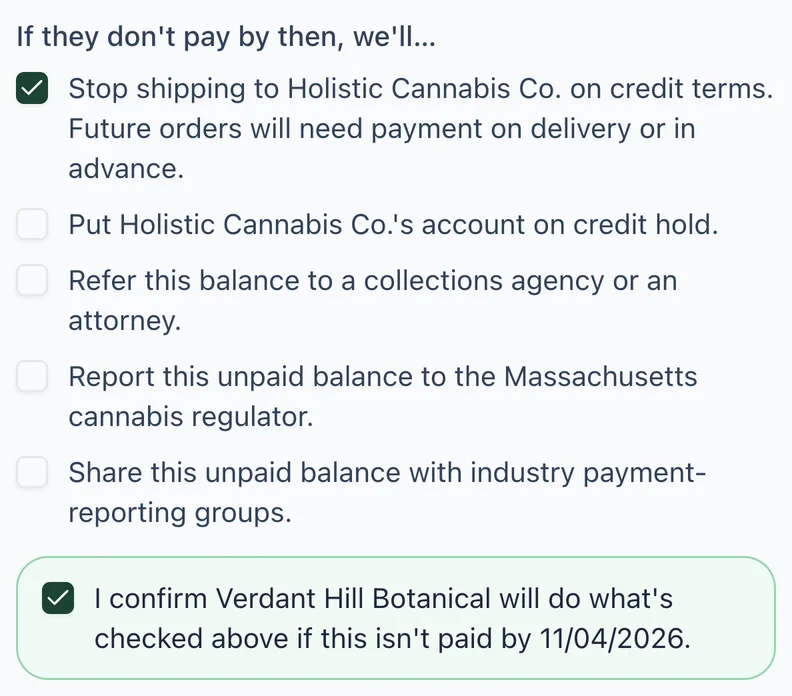
Last, choose what happens if the store still doesn't pay. There are five choices, and every one starts unchecked:
- Stop shipping to the store on credit terms. Future orders will need payment on delivery or in advance.
- Put the store's account on credit hold.
- Refer this balance to a collections agency or an attorney.
- Report this unpaid balance to the state cannabis regulator.
- Share this unpaid balance with industry payment-reporting groups.
Only tick what you'll really do. The moment you tick one, a confirmation box appears, and you confirm your company will follow through if it isn't paid by that date. A letter that threatens something you never do teaches the store to ignore the next one.
This letter isn't legal advice. If you're unsure about a consequence, check with your own attorney before you send.
What you preview is what gets sent
The editor shows two tabs: the Letter and the Email the store receives. Download preview saves the letter as a PDF for your records. Nothing changes between the preview and the send. The letter goes to the same people who get the invoice and its reminders.
Sending a letter doesn't pause anything. Your reminders keep going as usual, and nothing goes out on its own: every letter leaves only when you send it, or tick it in Review and send. Sales rep logins don't get the Final notice button.
Where this fits
Final notice letters are part of ShelfCollect, ShelfSpace's done-for-you accounts receivable for cannabis brands, cultivators and distributors. Every invoice goes out with a payment link, reminders run on a schedule in your brand's name, and slow accounts can move to a 0% payment plan. For why wholesale invoices drift past terms in the first place, see Cannabis Net Terms: How to Get Invoices Paid. See the letter, the editor and every place to send it on Final Notice.
The first step is free: we'll look at your open invoices and show you which accounts are past your mark.